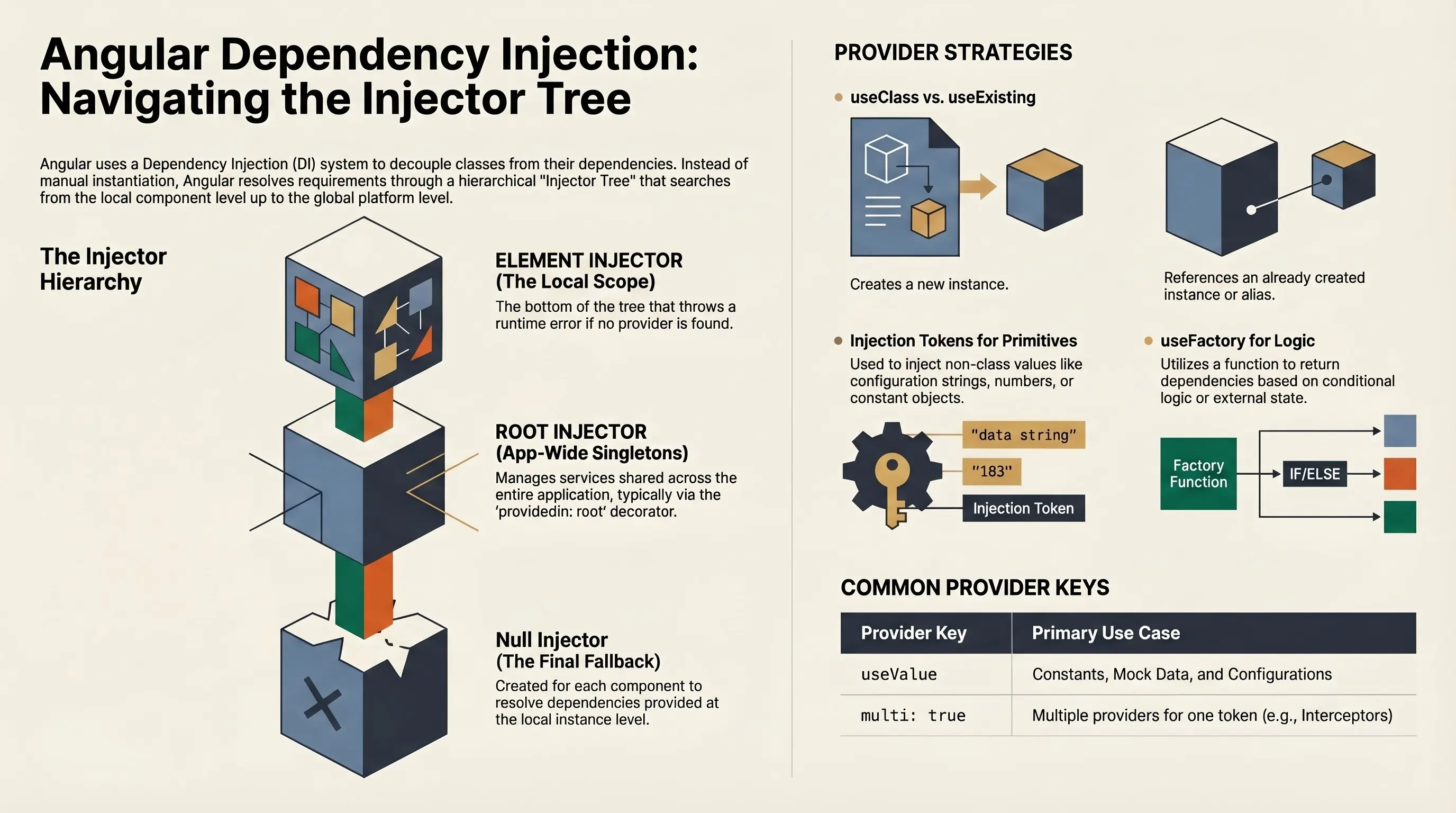
Dependency Injection is a design pattern and core part of Angular's architecture that allows components, services, and other classes to declare their dependencies and have them automatically provided by the framework, rather than creating them manually.
Why it matters:
- Decouples classes from their dependencies
- Promotes testability and reusability
- Encourages modular, maintainable architecture
Dependency Injection Mechanism
Angular allows classes with Angular decorators, such as Components, Directives, Pipes, and Injectables, to configure dependencies via the Injector Tree. The Injector Tree is a hierarchical structure of injectors that Angular uses to determine how and where to resolve requested dependencies, starting from the component level and moving up toward global scopes.
Consider this manually-wired class:
class Api {
  endpointUrl: string;
  http = new HttpClient(new OurHttpHandler());

  constructor(endpointUrl: string) {
    this.endpointUrl = endpointUrl;
  }
}
This creates deeply nested object structure:
{
  endpointUrl: 'http://localhost:3333/api',
  http: {
    handler: {
      handlerProps: {
        prop: { ... }
      }
    },
    post(...) { ... }
  }
}
Here's the issue:
-
HttpClientrequires aHttpHandler, which is an abstract class, meaning you have to manually implement and instantiate it. - You're tightly coupling your class to low-level implementation details.
- As complexity increases, this becomes hard to maintain, test, and reuse.
Angular's DI Mechanism eliminates manual instantiation by:
- Managing object creation behind the scenes
- Sharing instances across your app
- Making classes easier to mock, replace, and test
Instead of creating an instance of the class like we did above, we can inject the dependency
using the inject function, something like this:
@Injectable({ providedIn: 'root' })
export class Api {
  private endpointUrl = inject(API_ENDPOINT_URL);
  private http = inject(HttpClient);
}
Rather than creating and passing deeply nested dependencies manually, Angular's Dependency Injection mechanism allows classes to declare what they need, and the injector tree supplies it, improving code clarity, scalability, and testability.
Also, we can inject plain objects or variables as well by using the Injection Token like we
did for the endpointUrl property. More on that later.
Injector Tree
When bootstrapping an Angular application using either
bootstrapApplication (standalone APIs) or
bootstrapModule (NgModules), Angular initializes a hierarchical Dependency
Injection (DI) system, often referred to as the Injector Tree.
Null Injector
At the very bottom of the injector tree sits the Null Injector. It acts as the ultimate fallback. If a requested dependency cannot be found in any other injector, the Null Injector throws a runtime error:
NullInjectorError: No provider for <ServiceName>!Its sole responsibility is to fail fast when a dependency resolution hits the bottom with no result.
Platform Injector
Just above the Null Injector is the Platform Injector. It's created when Angular is first
loaded (via platformBrowser or platformBrowserDynamic).
It contains global singletons such as the Angular Compiler, which should be shared across:
- The entire application.
- Multiple Angular apps running on the same page.
This layer is rarely customized, but it's essential to support advanced use cases and bootstrapping logic.
Root Injector
The Root Injector is a central part of Angular's DI hierarchy and is responsible for providing application-wide singleton services.
-
Services decorated with
@Injectable({ providedIn: 'root' })are registered with this injector. - These services are instantiated once and shared across the entire app, making them efficient and easily accessible.
Additionally, Angular allows services and injection tokens to be provided through the Application Configuration object when using the standalone API:
bootstrapApplication(AppComponent, {
  providers: [
    provideHttpClient(),
  ]
});
Now we can use the HttpClient injectable class across the application.
Element Injector
The Element Injector is an instance-level injector created for each component or directive in the component tree. It is responsible for resolving dependencies that are provided locally at the component or directive level.
@Component({
  selector: 'mk-widget',
  providers: [WidgetService]
})
export class WidgetComponent {
  private readonly widgetService = inject(WidgetService);
}
By adding a provider (WidgetService) in the providers array of the
Component's decorator, each time the component is created, new instance of the
WidgetService is created as well and its lifespan will depend on the lifespan
of the component. Also, this instance will be visible in the children's scope of this
component/directive.
Services & Injection Tokens
Angular's Dependency Injection system is built around providers, which associate tokens with
dependencies (usually services). These tokens can either be classes (types) or
InjectionToken instances.
Whenever we ask for a dependency, we are traversing from Element Injector down to the Null Injector where we can get an error if no provider is found for that dependency.
Services
A service in Angular is typically a class annotated with @Injectable() and
designed to encapsulate reusable business logic, state, or utility behavior.
Services can be singletons (if provided in root) or scoped (if provided in component, directive, module or route).
Injection Tokens
In Angular, Injection Tokens are a way to tell the Dependency Injection system what to inject, especially when you're not injecting a class. They are useful when:
- You're injecting primitives (string, number, boolean)
- You're injecting a configuration object
- You have multiple implementations of the same interface/type -aliasing
- You want strong typing for something that doesn't have a class
Let's consider the already mentioned example for the API Service. Instead of using constructor or other methods to set the endpoint we can inject it as an constant variable.
import { InjectionToken } from '@angular/core';

export const API_ENDPOINT_URL = new InjectionToken<string>('API_ENDPOINT_URL', {
  providedIn: 'root',
  factory: () => {
    return 'https://dummyjson.com';
  },
});
As you can see, our Injection Token also has the providedIn: 'root' property
and with factory function that resolves it's value, it is ready to use.
@Injectable({
  providedIn: 'root',
})
export class Api {
  private readonly endpointUrl = inject(API_ENDPOINT_URL);
  private readonly http = inject(HttpClient);

  post<T, G = any | null>(path: string, body: G) {
    return this.http.post<T>(`${this.ENDPOINT}/${path}`, body);
  }
}
Overriding Providers
By default, services provided in root are singletons. But you can override them per Route/Module/Component/Directive:
@Component({
  selector: 'mk-widget',
  providers: [WidgetService]
})
export class WidgetComponent {...}
This allows fine-grained control, useful for:
- Testing
- Feature-specific logic
- Development/debug environments
Real World Example
Consider we are implementing a Payments service that will act differently if user is paying via PayPal or ApplePay services. We could generate a Payments service that will inject our API so we can process our payment whether it is paid via PayPal or ApplePay service.
Let's generate a Payments service with Angular CLI:
ng generate service core/services/paymentsAlso, let's make it abstract so we never actually work with the Payments Service itself:
import { inject, Injectable } from '@angular/core';
import { Api } from './api';

@Injectable({
  providedIn: 'root',
})
export abstract class Payments {
  protected readonly api = inject(Api);
  abstract pay: (amount: number) => number;
}
The Api service is injected into the abstract Payments class to
ensure that all payment implementations have access to the API functionality without
duplicating the injection logic in every subclass. This helps keep the subclasses focused
solely on their unique behavior and encourages DRY principles.
Now let's generate PayPalPayments and ApplePayPayments services.
ng generate service core/services/apple-pay-payments
ng generate service core/services/pay-pal-payments
And implement pay methods:
@Injectable({
  providedIn: 'root',
})
export class ApplePayPayments extends Payments {
  pay = (amount: number) => amount + 0.003;
}

@Injectable({
  providedIn: 'root',
})
export class PayPalPayments extends Payments {
  pay = (amount: number) => amount + 0.002;
}
Let's imagine that ApplePay and PayPal take 0.003 cents and 0.002 cents respectively when processing the payment. :)
Now if we try to use the abstract Payments class directly, we would get a
compiler error.
Type 'typeof Payments' is not assignable to type 'Provider'.
Type 'typeof Payments' is not assignable to type 'TypeProvider'.
Cannot assign an abstract constructor type to a non-abstract constructor type.
It is time to override the provider.
To override an abstract class like Payments, we can register a concrete
implementation with Angular's provider system. For example, let's say you want to use
ApplePayPayments in a certain part of your app like
ApplePayWidget which extends abstract PaymentWidget class.
Our PaymentWidget abstract is simple. It injects the
Payments service, holds the value of the amount to be paid and has a
pay method that alerts the user with the message how much they ended up paying.
export abstract class PaymentWidget {
  private readonly payments = inject(Payments);
  abstract readonly type: 'PayPal' | 'ApplePay';
  readonly value = signal(0);

  readonly total = computed(() => {
    const value = this.value();
    return value === 0 || value === null ? 0 : this.payments.pay(value);
  });

  pay() {
    alert(`You just paid $${this.total()}$ with ${this.type}`);
  }
}
Our actual implementation will be simple. Just assign the type value and a very simple UI.
@Component({
  selector: 'app-apple-pay-widget',
  imports: [FormsModule, CurrencyPipe],
  providers: [
    {
      provide: Payments,
      useExisting: ApplePayPayments,
    },
  ],
  template: `
    <h5>{{type}}</h5>
    <input type="number" min="0" [(ngModel)]="value" />
    <div>Total: <span>{{ total() | currency }}</span></div>
    <button (click)="pay()">Pay</button>
  `,
})
export class ApplePayWidget extends PaymentWidget {
  readonly type = 'ApplePay';
}
Dependency Providers
Notice the providers array of the component's decorator. We have added an
element to provide Payments service and useExisting class
ApplePayPayments service.
useExisting:
Use existing means that Dependency Injection will traverse the Injection Tree and look for
the already existing instance of the class ApplePayPayments or create new
instance if it's provided. If it's not provided, it will throw us the already known error:
NullInjectorError: No provider for ApplePayPayments!useClass:
Another option is useClass. It tells Angular to create a new instance of the
specified class. In our case, each time ApplePayWidget is created we would
create a new instance of the ApplePayPayments class. In other words, lifetime
of the instance of the ApplePayPayments service is bound to the component that
provides that service.
@Component({
  selector: 'app-apple-pay-widget',
  providers: [
    {
      provide: Payments,
      useClass: ApplePayPayments,
    },
  ],
})
export class ApplePayWidget extends PaymentWidget {
useValue:
Provides a literal value, such as a string, number, object, or function. Useful for configuration values, constants, mock data.
@Component({
  selector: 'app-apple-pay-widget',
  providers: [
    {
      provide: Payments,
      useValue: {
        pay(amount: number) {
          return amount;
        }
      },
    },
  ],
})
export class ApplePayWidget extends PaymentWidget {
useFactory:
Uses a factory function to return the dependency. Great for conditional logic or derived services.
@Component({
  selector: 'app-apple-pay-widget',
  providers: [
    {
      provide: Payments,
      useFactory: () => {
        const auth = inject(Auth);
        const role = auth.role(); // signal value of role of the user
        if (role === Role.DEV) {
          return FakeApplePayPayments;
        }
        else {
          return ApplePayPayments;
        }
      }
    },
  ],
})
export class ApplePayWidget extends PaymentWidget {
multi: true
Allows multiple providers for the same token, and Angular will inject an array of all
values. Often used with HttpInterceptors or similar.
Conclusion
Dependency Injection is more than just a core concept in Angular - it's the backbone of how scalable, testable, and maintainable applications are built. By abstracting away the creation and management of dependencies, Angular empowers developers to focus on business logic instead of wiring.
Next time you're injecting a service, remember: you're not just pulling in a class - you're climbing the tree.