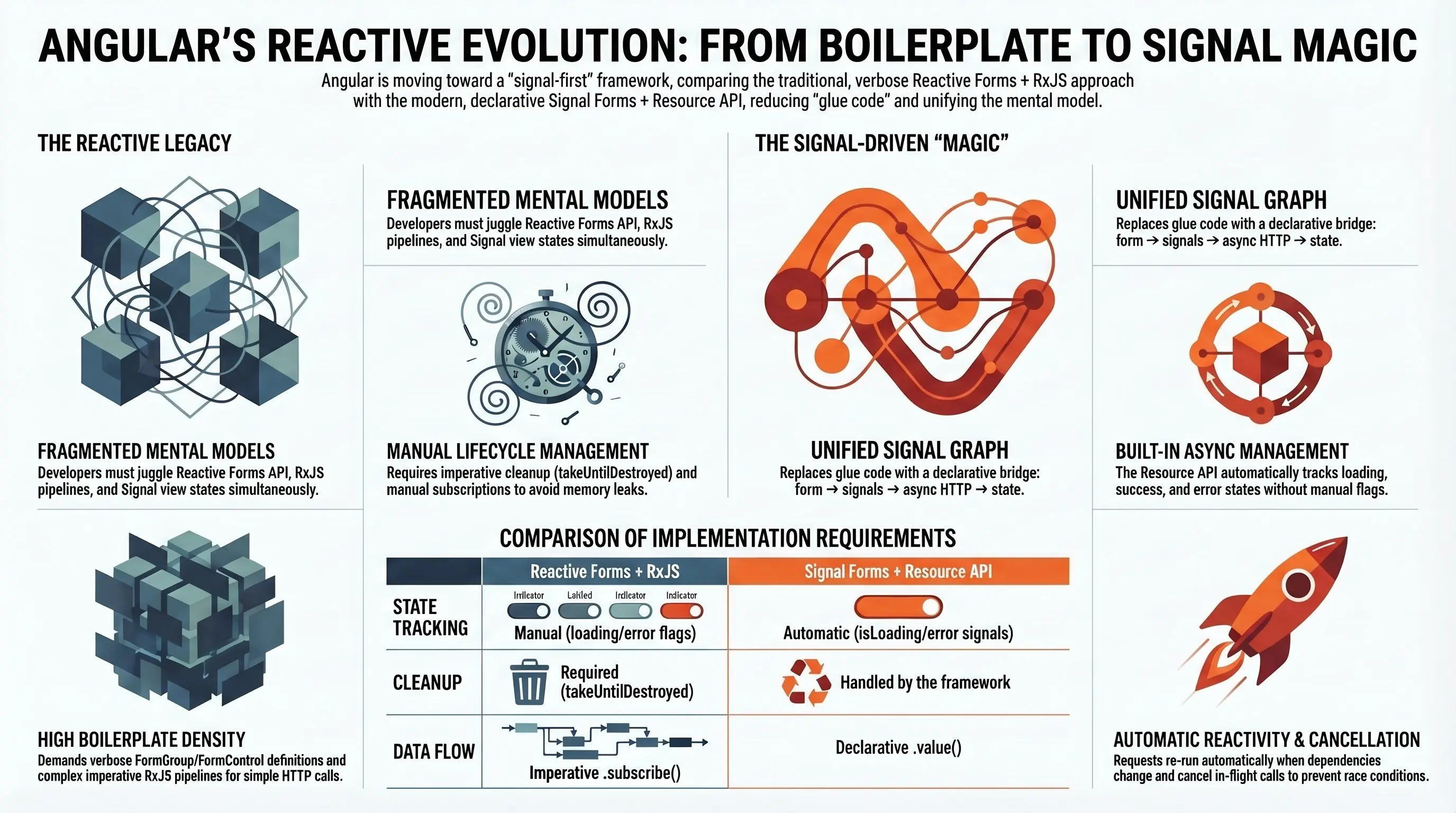
With the newest version of Angular comes one of the most impactful changes to its reactive ecosystem: Signal Forms - a modern, signal-driven way to handle web forms in Angular.
For years, we relied on Reactive Forms, a powerful but sometimes verbose API that required a lot of boilerplate:
FormGroup,FormControl,FormArray- manual subscriptions and cleanup
patchValue/setValuecalls- imperative RxJS pipelines just to connect form values to HTTP calls
Reactive Forms served us well, but as Angular evolved into a signal-first framework, the gap between the synchronous world of signals and the asynchronous mechanics of Reactive Forms became more visible.
Signal Forms close that gap on the form state side.
And when you combine them with the Resource API, you also get a clean, declarative bridge between:
form → signals → async HTTP → signal state again.
Before we get to the "magic" version, let’s look at a typical real-world example using classic Reactive Forms.
Real-World Example: Product Search Form (Reactive Forms)
Imagine you’re building an e-commerce platform that supports searching and filtering products based on different criteria.
To keep things focused, we’ll start with a single search input field that queries a public API.
The API response looks like this:
export interface ProductsResponse {
  products: unknown[]; // Product[]
  total: number;
  skip: number;
  limit: number;
}
A straightforward Reactive Form implementation might look like this:
import { Component, DestroyRef, OnInit, inject, signal } from '@angular/core';
import { HttpClient } from '@angular/common/http';
import { FormControl, FormGroup, ReactiveFormsModule } from '@angular/forms';
import { debounceTime, map, startWith, switchMap } from 'rxjs/operators';
import { takeUntilDestroyed } from '@angular/core/rxjs-interop';
import { NgFor, JsonPipe } from '@angular/common';

@Component({
  selector: 'app-root',
  imports: [ReactiveFormsModule, NgFor, JsonPipe],
  styleUrl: './app.css',
  template: `
    <main>
      <form [formGroup]="form">
        <div>
          <input
            type="text"
            formControlName="search"
            placeholder="Search for products..."
          />
        </div>
      </form>

      <!-- Products list -->
      <ul>
        <li *ngFor="let product of products()">
          {{ product | json }}
        </li>
      </ul>
    </main>
  `,
})
export class App implements OnInit {
  private readonly http = inject(HttpClient);
  private readonly destroyRef = inject(DestroyRef);

  protected readonly form = new FormGroup({
    search: new FormControl(''),
  });

  protected readonly products = signal<unknown[]>([]);

  ngOnInit(): void {
    this.form.valueChanges
      .pipe(
        startWith(this.form.value),
        debounceTime(300),
        map(value => ({ q: value.search ?? '' })),
        switchMap(params =>
          this.http.get<ProductsResponse>(
            'https://dummyjson.com/products/search',
            { params },
          ),
        ),
        takeUntilDestroyed(this.destroyRef),
      )
      .subscribe({
        next: data => {
          this.products.set(data.products);
        },
        error: err => console.error('Error fetching products:', err),
      });
  }
}
What’s "wrong" with this picture?
This works - but notice how much is going on just to wire a single search field to an HTTP call:
-
The form lives in Reactive Forms land (
FormGroup,FormControl). -
The search logic is implemented as an imperative RxJS pipeline in
ngOnInit. -
We manually:
- debounce input,
- build query params,
- switch to a new HTTP call,
- subscribe,
- and push the result into a signal (
products).
- We need
takeUntilDestroyed(this.destroyRef)to avoid leaks.
So we end up with three mental models in one component:
- Reactive Forms API for form state
- RxJS for async work and side-effects
- Signals for view state (
products)
This is exactly the kind of glue code that Signal Forms + Resource API are designed to simplify.
Reactive Form to Signal Form
Migrating a Reactive Form to a Signal Form can be done in a few clear steps:
- Remove
ReactiveFormsModulefrom imports. -
Remove the
[formGroup]directive from the<form>element. - Move your form model into a signal-backed object.
-
Use the
formfunction from@angular/forms/signalsto build a Signal Form out of that model. -
Use the
Fielddirective from@angular/forms/signalsto bind your inputs.
In other words:
import { Field } from '@angular/forms/signals';

@Component({
  selector: 'app-root',
  imports: [Field, JsonPipe, NgFor],
  styleUrl: './app.css',
  template: `
    <main>
      <form>
        <div>
          <input
            type="text"
            [field]="form.search"
            placeholder="Search for products..."
          />
        </div>
      </form>

      <!-- Products list -->
      <ul>
        <li *ngFor="let product of products()">
          {{ product | json }}
        </li>
      </ul>
    </main>
  `,
})
export class App {
  private readonly http = inject(HttpClient);

  private readonly model = signal<{ search: string; }>({
    search: ''
  });

  protected readonly form = form<{ search: string; }>(this.model);
  // ...
}
At this point, the refactoring is clean and minimal.
But now comes the fun part:
How do we replace the RxJS pipeline and subscription with something that fits nicely into Angular’s signal model?
Resource API to the Rescue
We want our Products API to react to form value changes.
Yes, we could do something like toObservable(this.model) and rebuild the same
RxJS pipeline. It would work… but:
- Where do we keep loading state?
- Where do we expose errors?
- How do we cancel in-flight requests when the search changes quickly?
- How do we stay inside the signal graph instead of bolting RxJS on the side?
But it quickly gets messy when we also want:
- loading state
- error state
- cache or retry logic
- cancellable requests
- reactivity based on dependencies
Signals shine with purity and synchronous state, but real applications aren’t purely synchronous - we fetch, mutate, poll, and stream.
The Resource API gives us a unified, declarative way to:
- bind asynchronous data sources to signals
- track loading, success, and error states
- re-run automatically when dependencies change
- cancel previous in-flight requests
- stay inside Angular’s reactive graph
No RxJS pipeline, no ngOnInit, no manual cleanup.
Angular gives you two flavors of Resource:
resourcefor async/Promise-based loaders-
rxResourcefrom@angular/core/rxjs-interopfor Observable-based streams (likeHttpClient)
In this article we’ll focus on rxResource, since
HttpClient returns Observables.
Creating an RxResource is simple - just call the rxResource function:
import { rxResource } from '@angular/core/rxjs-interop';

protected readonly products = rxResource<ProductsResponse, { search: string }>({
  params: () => this.form().value(),
  stream: ({ params }) => {
    return this.http.get<ProductsResponse>(
      'https://dummyjson.com/products/search',
      { params: { q: params.search } },
    );
  },
});
What’s happening here?
-
params: () => this.form().value(): The Resource tracks the Signal Form value as a dependency. Whenever the form value changes the resource re-runs. -
stream: {{ '{' }} params {{ '}' }} => this.http.get(…: For each new set of params, we return an Observable (our HTTP call).rxResourcesubscribes for us, handles cancellation when params change, and updates its internal signal state.
The result is a single, declarative resource we can use in the template as:
products.value()- current dataproducts.isLoading()- loading flagproducts.error()- error object
All without writing a single subscribe().
The "Magic" Version: Signal Form + RxResource
Here’s the full version using:
- Signal Forms for the search field
- debounce for UX
- RxResource for the HTTP call + loading/error/value states
- Tailwind just to make the demo look nice
import { JsonPipe } from '@angular/common';
import { HttpClient } from '@angular/common/http';
import { Component, effect, inject, signal } from '@angular/core';
import { rxResource } from '@angular/core/rxjs-interop';
import { debounce, Field, form, submit } from '@angular/forms/signals';

export interface ProductsSearchQuery {
  search: string;
}

export interface ProductsResponse {
  products: unknown[];
  total: number;
  skip: number;
  limit: number;
}

@Component({
  selector: 'app-root',
  imports: [Field, JsonPipe],
  styleUrl: './app.css',
  template: `
    <div class="min-h-screen bg-linear-to-br from-blue-50 to-indigo-100 py-12 px-4 sm:px-6 lg:px-8">
      <div class="max-w-4xl mx-auto">
        <h1 class="text-4xl font-bold text-center text-gray-900 mb-8">
          {{ title() }}
        </h1>

        <!-- Form section -->
        <section class="bg-white rounded-lg shadow-lg p-6 mb-8">
          <h2 class="text-2xl font-semibold text-gray-800 mb-4 flex items-center">
            <svg class="w-6 h-6 mr-2 text-indigo-600" fill="none" stroke="currentColor" viewBox="0 0 24 24">
              <path stroke-linecap="round" stroke-linejoin="round" stroke-width="2" d="M5 13l4 4L19 7" />
            </svg>
            Product Search Form
          </h2>

          <p class="text-gray-600 mb-4">
            Type in the search box below to find products. The search will be triggered 300ms after you stop typing.
          </p>

          <form (submit)="formSubmit($event)">
            <div class="relative mb-4">
              <input
                type="text"
                [field]="form.search"
                placeholder="Search for products..."
                class="w-full px-6 py-4 text-lg border-2 border-gray-300 rounded-lg shadow-sm
                       focus:outline-none focus:ring-2 focus:ring-indigo-500 focus:border-transparent
                       transition duration-200"
              />

              <svg
                class="absolute right-4 top-1/2 transform -translate-y-1/2 w-6 h-6 text-gray-400"
                fill="none" stroke="currentColor" viewBox="0 0 24 24"
              >
                <path stroke-linecap="round" stroke-linejoin="round" stroke-width="2"
                      d="M21 21l-6-6m2-5a7 7 0 11-14 0 7 7 0 0114 0z" />
              </svg>
            </div>

            @for (error of form.search().errors(); track error.message) {
              <div class="text-sm text-red-600 flex items-center gap-1 m-2">
                <svg class="w-4 h-4 text-red-500" fill="none" stroke="currentColor" viewBox="0 0 24 24">
                  <path stroke-linecap="round" stroke-linejoin="round" stroke-width="2"
                        d="M12 8v4m0 4h.01M21 12a9 9 0 11-18 0 9 9 0 0118 0z" />
                </svg>
                {{ error.message }}
              </div>
            }

            <button
              class="w-full sm:w-auto px-8 py-3 bg-indigo-600 text-white text-base font-semibold rounded-lg
                     shadow-md hover:bg-indigo-700 hover:shadow-lg focus:outline-none focus:ring-2
                     focus:ring-indigo-500 focus:ring-offset-2 active:scale-95
                     transition-all duration-200 flex items-center justify-center gap-2"
              type="submit"
              [disabled]="form().submitting()"
            >
              Submit Search
            </button>
          </form>
        </section>

        <!-- Results section -->
        <section class="bg-white rounded-lg shadow-lg p-6">
          <h2 class="text-2xl font-semibold text-gray-800 mb-4 flex items-center">
            <svg class="w-6 h-6 mr-2 text-indigo-600" fill="none" stroke="currentColor" viewBox="0 0 24 24">
              <path stroke-linecap="round" stroke-linejoin="round" stroke-width="2"
                    d="M9 5H7a2 2 0 00-2 2v12a2 2 0 002 2h10a2 2 0 002-2V7a2 2 0 00-2-2h-2M9 5a2 2 0 002 2h2a2 2 0 002-2M9 5a2 2 0 012-2h2a2 2 0 012 2" />
            </svg>
            Products Search Result
          </h2>

          @if (products.hasValue()) {
            <div class="bg-gray-50 rounded-lg p-4 overflow-auto max-h-96">
              <pre class="text-sm text-gray-700 whitespace-pre-wrap">
{{ products.value() | json }}
              </pre>
            </div>
          }
          @else {
            @if (products.isLoading()) {
              <p class="text-gray-500">Loading products...</p>
            }
            @else if (products.error()) {
              <div class="bg-red-50 border border-red-200 rounded-lg p-4 flex items-center justify-between">
                <div class="flex items-center">
                  <svg class="w-5 h-5 text-red-500 mr-2" fill="none" stroke="currentColor" viewBox="0 0 24 24">
                    <path stroke-linecap="round" stroke-linejoin="round" stroke-width="2"
                          d="M12 8v4m0 4h.01M21 12a9 9 0 11-18 0 9 9 0 0118 0z" />
                  </svg>
                  <p class="text-red-700 font-medium">Error loading products.</p>
                </div>
                <button
                  class="ml-4 px-4 py-2 bg-red-600 text-white rounded-md hover:bg-red-700
                         focus:outline-none focus:ring-2 focus:ring-red-500 focus:ring-offset-2
                         transition duration-200 font-medium"
                  (click)="products.reload()"
                >
                  Retry
                </button>
              </div>
            }
          }
        </section>
      </div>
    </div>
  `,
})
export class App {
  protected readonly title = signal('Signal Forms with RxResource');
  private readonly http = inject(HttpClient);

  private readonly model = signal<ProductsSearchQuery>({
    search: '',
  });

  // 1) Build a Signal Form from the model + debounce
  protected readonly form = form<ProductsSearchQuery>(this.model, schema => {
    debounce(schema, 300); // debounce form value changes by 300ms
  });

  // 2) Bind async HTTP to Resource state
  protected readonly products = rxResource<ProductsResponse, ProductsSearchQuery>({
    params: () => this.form().value(),
    stream: ({ params }) =>
      this.http.get<ProductsResponse>('https://dummyjson.com/products/search', {
        params: { q: params.search },
      }),
  });

  // Optional: Debug effects to inspect form and resource status in devtools
  readonly #productsStatusEffect = effect(() => {
    console.info('Products Status:');
    console.table({
      status: this.products.status(),
      loading: this.products.isLoading(),
      hasValue: this.products.hasValue(),
      error: this.products.error(),
    });
  });

  readonly #formStatusEffect = effect(() => {
    console.info('Form Status:');
    console.table({
      valid: this.form().valid(),
      invalid: this.form().invalid(),
      pending: this.form().pending(),
      disabled: this.form().disabled(),
      dirty: this.form().dirty(),
      touched: this.form().touched(),
      submitting: this.form().submitting(),
      errors: this.form().errors(),
    });
  });

  protected formSubmit(event: Event): void {
    event.preventDefault();

    submit(this.form, async () => {
      // Just to demo field-level errors:
      return [
        {
          kind: 'error',
          field: this.form.search,
          message: 'Simulated error on search field.',
        },
      ];
    });

    console.info('Form Submitted:');
    console.table(this.form().value());
  }
}
What Did We Gain?
Compare this with the original Reactive Forms + RxJS version:
-
No
FormGroup,FormControl,valueChanges,takeUntilDestroyed. - No manual subscription, no
ngOnInit. - Debounce is declared at the form level:
debounce(schema, 300). -
rxResource:-
tracks status,
isLoading,error,hasValue - automatically re-runs when params change
- keeps everything in the signal graph
-
tracks status,
Your mental model becomes:
- Signal Form for synchronous form state
- RxResource for asynchronous data state
- Template just reacts to signals and resource status
The code reads almost like a description of the UI behavior.
️ A Note on Experimental APIs
At the time of writing, both:
- Signal Forms, and
- Resource / RxResource
are still marked as experimental / developer-preview in Angular. They’re already very usable, but small API changes may still happen between versions.
That said, the core idea - connect forms → signals → async resources - is here to stay, and it’s already a huge quality-of-life improvement over the classic setup.
When to Reach for Signal Forms + Resource API
You’ll feel the most value when:
- Your forms are tightly coupled with HTTP calls (searches, filters, autocompletes, wizard steps).
- You want to avoid glue code and keep everything inside the signal model.
-
You care about:
- loading/error states in the template,
- proper cancellation of in-flight requests,
- keeping your components small and declarative.
For simple forms that don’t hit APIs, Reactive Forms are still fine.
But once your UI starts dancing with the backend, Signal Forms + Resource API really do feel like magic.